Cloud Journey with AWS

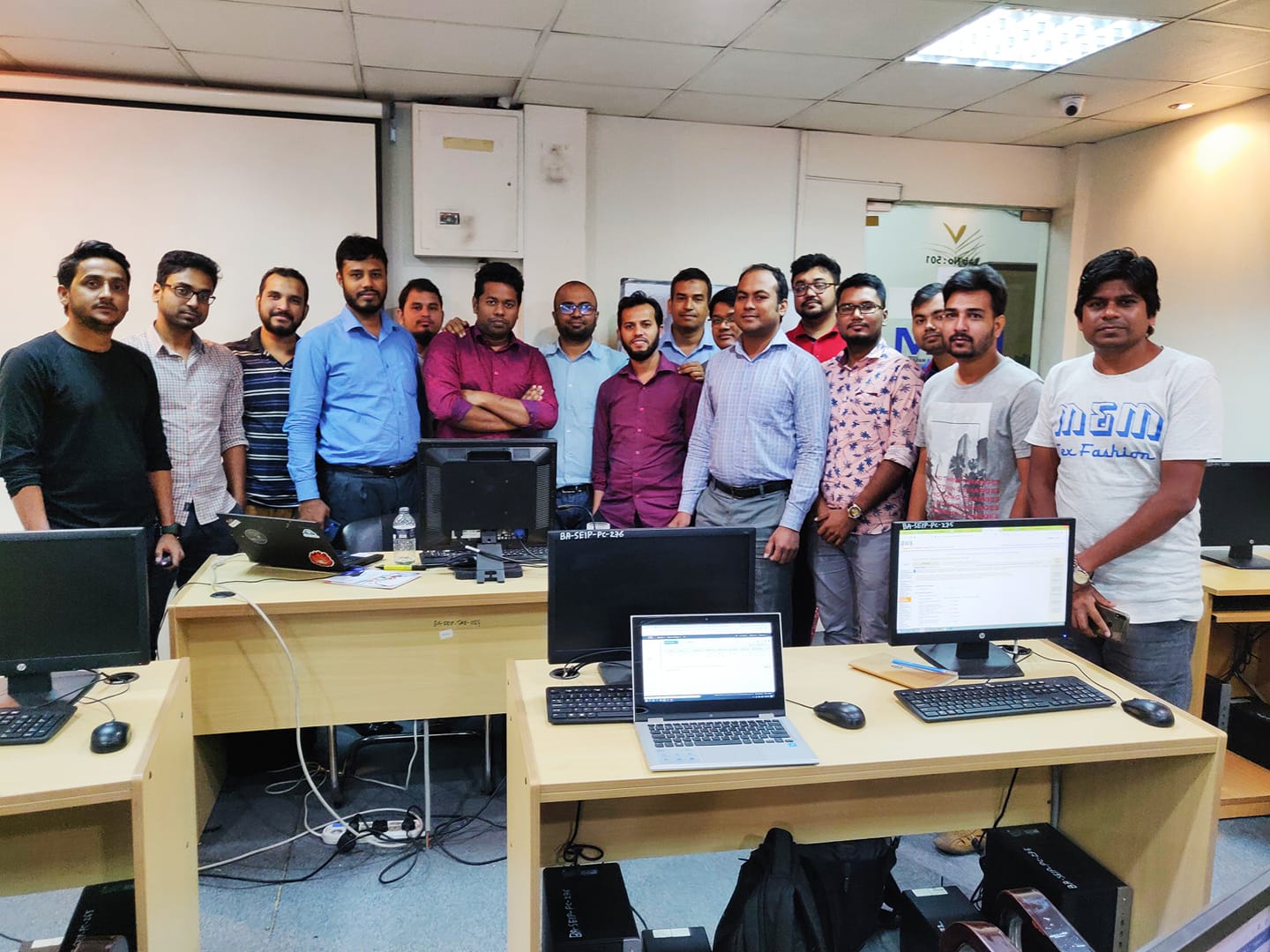
I am the official trainer of AWS Cloud in one of the top training institute. BITM is the training wing of Bangladesh software Association (BASIS) (https://basis.org.bd/). I have trained a total of 10 batches (3 offline and 7 online) as requested by the Bangladesh Software Association. 7th online batch just completed and 8th online batch about to start which advertisement link given below. 

I have shared the course outline below:

Class 01:
Introduction to Amazon Web Services (AWS)
About AWS
Elastic computing
Advantage of cloud computing
Types of Cloud Computing
Introduction to the AWS products
AWS Security Compliance
Regions and Availability Zones
Signing up for AWS
AWS Free usage tier
Introduction AWS management console


Class 02 & Class 03:

EC2 Instances & ELB (Elastic Load Balancer)
Understanding AMI
Launching your first AWS instance
Hands-on Exercise on EC2
On-demand Instance pricing
Reserved Instance pricing
Spot instance pricing
Settings up security groups
Amazon Machine Images (AMI)
IP Addressing Scheme
Public and Private IP’s
Key Pairs
Elastic IP’s

ELB (Elastic Load Balancer)
Introduction to ELB
Basic ELB concepts
Internet-facing ELB
VPC-facing ELB
Create an ELB (Elastic Load Balancer)
Adding and removing instances on ELB

EBS (Elastic Block Storage)
Create EBS volumes
Delete EBS Volumes
Attach and detach EBS volumes
Mounting and un-mounting EBS volume
Creating and deleting snapshots
Creating volumes from snapshots

Auto scaling
Horizontal vs. vertical scaling
Boot strapping
Create a launch configuration
Create an Auto Scaling group
Create a policy for your Auto Scaling group
Setting up an auto-scaled, load-balanced Amazon EC2 application

Class 04:
Relational Database Service (RDS)
Selecting the Database type
Configuring the database
Hands-on Exercise on EC2
Creating database Configuring backups
Configuring the maintenance windows
Connecting to the database

Amazon Virtual Private Cloud (VPC)
What is VPC?
VPC configuration
VPC security
Elastic IP’s
Inbound and outbound ACL’s

AWS Cloud Trail
What is CloudTrail
How it works


Class 05:
Route53
Creating zones
Hosting a website Understanding routing policies
Weighted simple and failover policies

S3 (Simple Storage Service)
What is S3?
RRS (Reduced Redundancy storage)
S3 durability and redundancy
S3 Buckets
S3 Uploading Downloading
S3 Permissions

S3 Object Versioning
S3 Lifecycle Policies
Glacier storage

Cloud Watch Dashboard
Configuring Monitoring services
Setting thresholds
Configuring actions
Creating a cloudwatch alarm
Getting statistics for EC2 instances
Monitoring other AWS services
Configuring Notifications
Integrating cloudwatch with Auto scaling

Class 06:
Simple Notification Service (SNS)
What is SNS? Creating a topic
Create subscription to different AWS Services

SES (Simple Email Services)

SQS (Simple Queue Service)

Identity access management (IAM)
Creating Users and Groups
Applying policies Password Policy Roles
Command Line Management.

Class 07:
Elastic Beanstalk
Creating environment
Application Versioning
Deploying a sample app
Hands-on Training

Cloud Formation
What is Cloud Formation?
Deploying template
Create Stack
Delete Stack
Provisioning application resources with Cloud Formation


Class 08:
CloudFront
Use of cloudfront
Creating a cloudfront distribution
Hosting a website of cloudfront distribution
Implementing restrictions Configuring origins and behaviors CDN (Content Delivery Network)

AWS Lambda
What is Server-less Architecture
Anatomy of Lambda Function
Lambda Execution Model
Common Lambda use cases
Amazon Api Gateway

Class 09:
AWS Certification Preparation
AWS Certification Program
Mockup Exam


Class 10:
Review of the full training
Trouble shooting

Robi Axiata Data Hackathon in AWS platform

We have recently provided technology support in organizing Data Hackathon for Robi Axiata (one of the top telecom companies in Bangladesh). It was for 2 days with 25 teams having 105 team members.

During facilitating this hackathon, we had to make sure the followings:

  1. Each team has a common URL to login AWS
  2. Each team can only access AWS SageMaker service
  3. They would be able to use only the following instance:

“ml.t3.small”,
“ml.t3.medium”,
“ml.t3.large”,
“ml.c5.large”,
“ml.m5.large”,
“ml.r5.large”,
“ml.r5.xlarge”

4. Each team will have $150 of budget for the Hackathon

1. Each team has a common URL to login AWS:

We have done the following to serve the the above points:

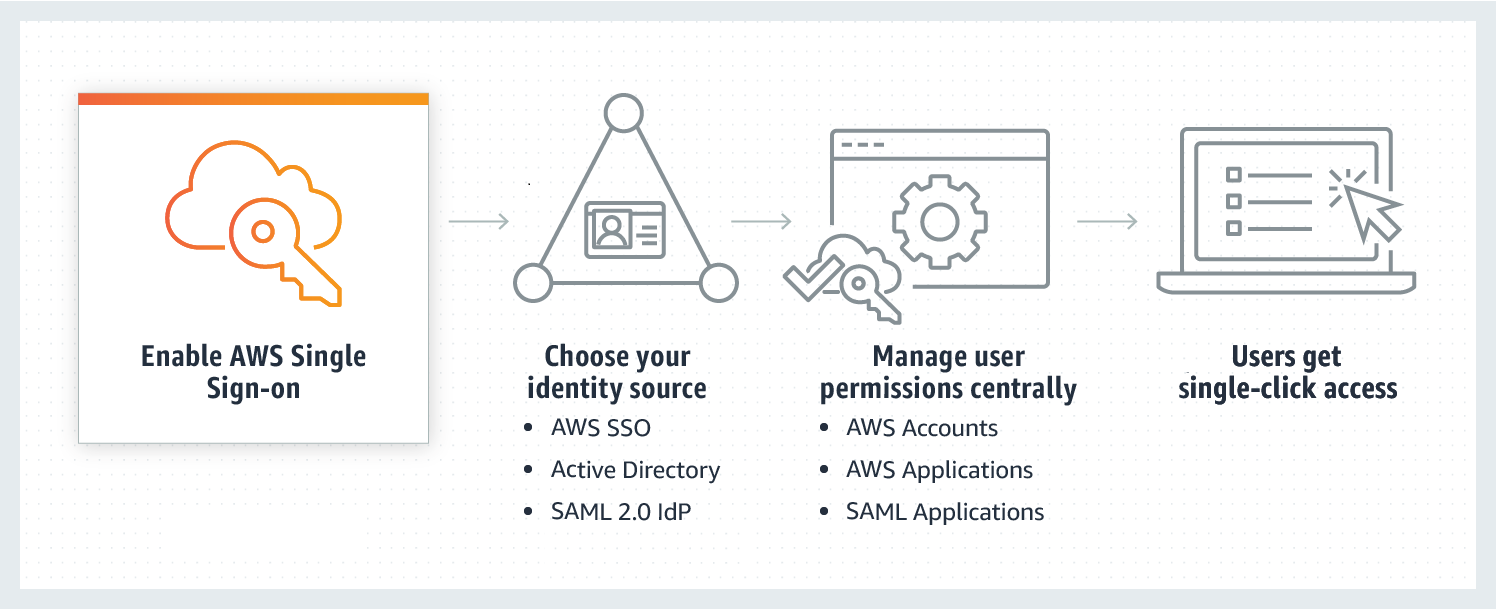
We have used Single Sign-On service where AWS SSO was the identity provider and we have created all the users which were assigned to different groups for different accounts.

2. Each team can only access AWS SageMaker and relevant services

Following code was added in the policy for AWS SSO permission set to access the SageMaker which is given below:

{
“Version”: “2012-10-17”,
“Statement”: [
{
“Sid”: “SageMakerApis”,
“Effect”: “Allow”,
“Action”: [
“sagemaker:” ], “Resource”: “
},
{
“Sid”: “VpcConfigurationForCreateForms”,
“Effect”: “Allow”,
“Action”: [
“ec2:DescribeVpcs”,
“ec2:DescribeSubnets”,
“ec2:DescribeSecurityGroups”
],
“Resource”: “” }, { “Sid”: “KmsKeysForCreateForms”, “Effect”: “Allow”, “Action”: [ “kms:DescribeKey”, “kms:ListAliases” ], “Resource”: “
},
{
“Effect”: “Allow”,
“Action”: [
“codecommit:BatchGetRepositories”,
“codecommit:CreateRepository”,
“codecommit:GetRepository”,
“codecommit:ListRepositories”,
“codecommit:ListBranches”,
“secretsmanager:CreateSecret”,
“secretsmanager:DescribeSecret”,
“secretsmanager:ListSecrets”
],
“Resource”: “” }, { “Sid”: “ListAndCreateExecutionRoles”, “Effect”: “Allow”, “Action”: [ “iam:ListRoles”, “iam:CreateRole”, “iam:CreatePolicy”, “iam:AttachRolePolicy” ], “Resource”: “
},
{
“Sid”: “DescribeECRMetaData”,
“Effect”: “Allow”,
“Action”: [
“ecr:Describe” ], “Resource”: “
},
{
“Sid”: “PassRoleForExecutionRoles”,
“Effect”: “Allow”,
“Action”: [
“iam:PassRole”
],
“Resource”: “*”,
“Condition”: {
“StringEquals”: {
“iam:PassedToService”: “sagemaker.amazonaws.com”
}
}
}
]
}

3. Restricted instance size:

To ensure restricted instance size, following policy was added:

{
“Action”: [
” ], “Resource”: [ “
],
“Effect”: “Deny”,
“Sid”: “BlockSagemaker”,
“Condition”: {
“ForAnyValue:StringNotLike”: {
“sagemaker:InstanceTypes”: [
“ml.t3.small”,
“ml.t3.medium”,
“ml.t3.large”,
“ml.t3.xlarge”,
“ml.c5.large”,
“ml.m5.large”,
“ml.r5.large”,
“ml.r5.xlarge”
]
}
}
}

4. Each team will have $150 of budget for the Hackathon

To ensure that AWS budget alert has been added along with different milestone with AWS SNS (both SMS and email) to make sure we are acknowledged as soon any teams’ usage reached the threshold to do different action related to it.

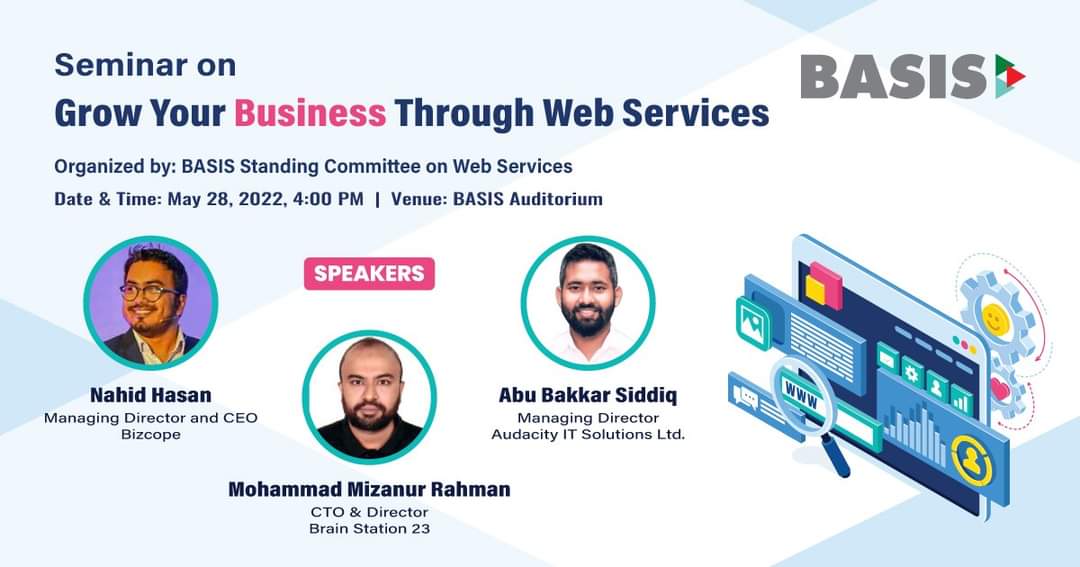
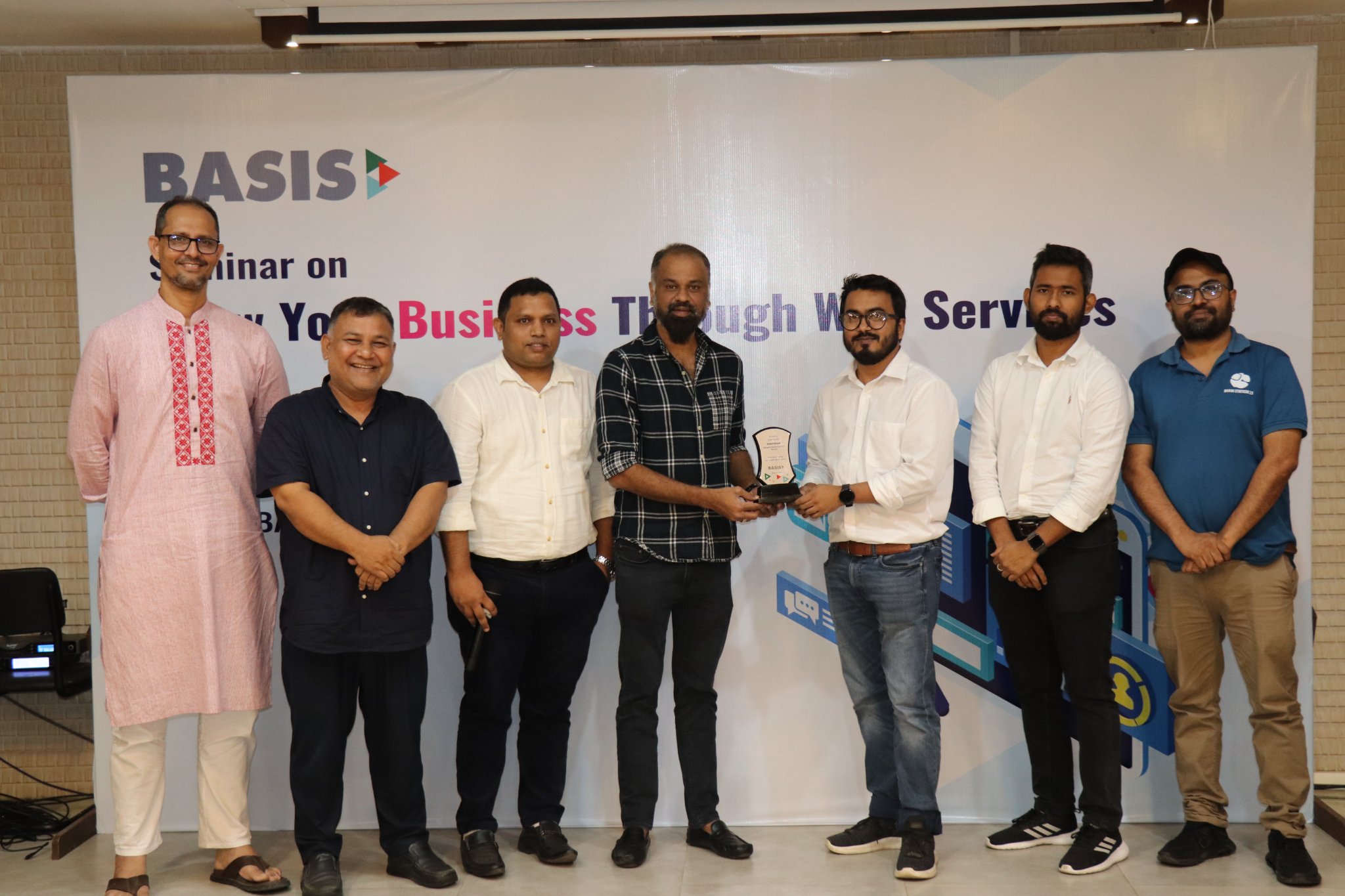
Seminar on Grow your business with web services

On 28th May, I was one of the speakers of the seminar on Grow your business with web services. My topic was “Security: Building and Hosting Web Application”. I tried to share different recommendation in terms security for both application development and hosting. This also included the benefit of leveraging public cloud like AWS to comply to different compliances and ensure business agility. I have shared the presentation deck in pdf format below.

Video of the seminar

AWS Control Tower

If you’re planning a large-scale AWS deployment, you’re probably wondering how to orchestrate multiple applications and teams on AWS. How do you make sure that every team can access AWS without your accounts turning into sprawling, ungoverned chaos?

Many companies find that a multi-account structure can help meet the unique needs of each application team or business group. But with so many tools and services available in AWS, it can be tough to keep track of everything – especially when you need to enforce security and billing configurations across multiple accounts.

Major control tower features given below:

Landing Zone
AWS Control Tower automates the setup of a new landing zone using best-practices blueprints for identity, federated access, and account structure. Examples of blueprints that are automatically implemented in your landing zone include:
Create a multi-account environment using AWS Organizations
Provide identity management using AWS Single Sign-On (AWS SSO) default directory
Provide federated access to accounts using AWS SSO
Centralize logging from AWS CloudTrail, and AWS Config stored in Amazon Simple Storage Service (Amazon S3)
Enable cross-account security audits using AWS Identity and Access Management (IAM) and AWS SSO
The landing zone set up by AWS Control Tower is managed using a set of mandatory and strongly recommended guardrails, which you select through a self-service console to ensure that accounts and configurations comply with your policies.

Account Factory
The account factory automates provisioning of new accounts in your organization. As a configurable account template, it helps you standardize provisioning of new accounts with pre-approved account configurations. You can configure your account factory with pre-approved network configuration and Region selections, and enable self-service for your builders to configure and provision new accounts using AWS Service Catalog. Additionally, you can take advantage of Control Tower Solutions like Account Factory for Terraform to automate the provisioning and customization of a Control Tower-managed account that meets your business and security policies, before delivering it to end users.

Preventive and Detective Guardrails
Guardrails are pre-packaged governance rules for security, operations, and compliance that you can select and apply enterprise-wide or to specific groups of accounts. A guardrail is expressed in plain English, and enforces a specific governance policy for your AWS environment that can be enabled within an AWS Organizations organizational unit (OU). Each guardrail has two dimensions: it can be either preventive or detective, and it can be either mandatory or optional. Preventive guardrails establish intent and prevent deployment of resources that don’t conform to your policies (for example, ‘Enable AWS CloudTrail in all accounts’). Detective guardrails (for example, ‘Detect whether public read access to Amazon S3 buckets is allowed’) continuously monitor deployed resources for nonconformance. AWS Control Tower automatically translates guardrails into granular AWS policies by:
Establishing a configuration baseline using AWS CloudFormation
Preventing configuration changes of the underlying implementation using service control policies (for preventive guardrails)
Continuously detecting configuration changes through AWS Config rules (for detective guardrails)
Updating guardrail status on the AWS Control Tower dashboard

Mandatory and Optional Guardrails
AWS Control Tower offers a curated set of guardrails based on AWS best practices and common customer policies for governance. You can automatically leverage mandatory guardrails as part of your landing zone setup. Some examples of mandatory guardrails include:
Disallow changes to AWS IAM roles set up by AWS Control Tower and AWS CloudFormation
Detect public read access setting for log archive
Disallow changes to bucket policy for AWS Control Tower created Amazon S3 buckets in log archive
Disallow cross-Region networking
You can also choose to enable optional guardrails at any time. All accounts provisioned under OUs where optional guardrails are enabled will automatically inherit those guardrails. Examples of optional guardrails include:
Detect whether public write access to Amazon S3 buckets is allowed
Detect whether MFA for the root user is enabled
Detect whether encryption is enabled for Amazon EBS volumes attached to Amazon EC2 instances


Dashboard
The AWS Control Tower dashboard gives you continuous visibility into your AWS environment. You can view the number of OUs and accounts provisioned and the number of guardrails enabled, and check the status of your OUs and accounts against those guardrails. You can also see a list of noncompliant resources with respect to enabled guardrails.

Solutions for AWS Control Tower in AWS Marketplace
AWS Marketplace now offers integrated third-party software solutions for AWS Control Tower. Built by independent software vendors, these solutions help solve infrastructure and operational use cases including security for a multi-account environment, centralized networking, operational intelligence, and Security and Information Event Management (SIEM).

AWS SSO with 0ffice365

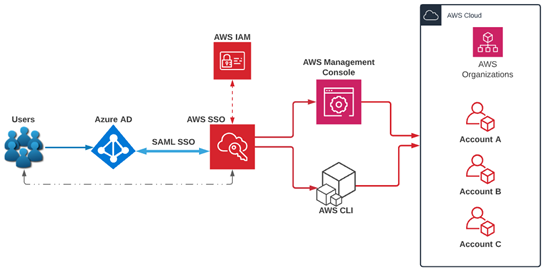
AWS SSO can play a very important role for an organization to have a central access, authentication and authorization capacity. Different companies use different authentications for their users. Today I will be sharing about the AWS SSO with Azure Active Directory for Office365. This whole process was initiated by Brain Station 23 system admin team (specially Abdur Rahim) which can be helpful for others.

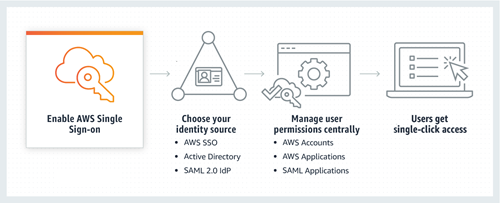
AWS Single Sign-On (SSO) with Azure Active Directory (AD)

SSO (single sign-on) is an authentication process that allows users to sign into multiple applications with a single set of usernames and passwords.

AWS SSO now provides a directory that you can use to create users, organize them into groups, and set permissions across those groups. You can also grant the users that you create in AWS SSO permissions to applications such as Office 365 and Azure AD.

AWS SSO also helps us manage access and permissions to commonly used third-party software. AWS SSO-integrated applications as well as custom applications that support Security Assertion Markup Language (SAML) 2.0. AWS SSO includes a user portal where your end-users can find and access all their assigned AWS accounts, cloud applications, and custom applications in one place.
Today, we will configure AWS SSO with Azure Active Directory and test our users together. Let’s start!

  • Go to AWS Console and select AWS SSO from the console. Select “Enable AWS SSO”.
  • Select “Choose your identity source.”
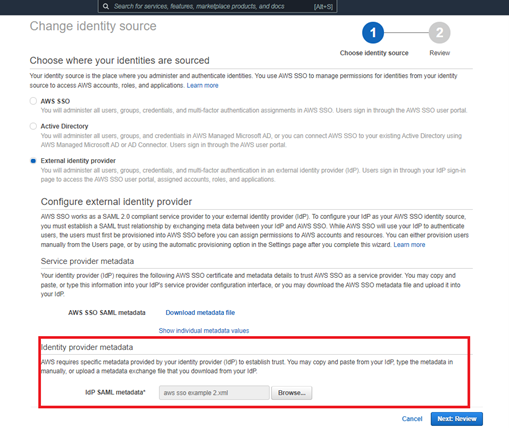
  • Choose the external identity provider for your Azure AD. We need to download “AWS SAML metadata” from here. We need it in another step.
  • On the Azure Cloud side, we need to create a new app from the Azure AD → Enterprise application→ New application →Create your own Application. When we create an application, we need to select “Integrate any other application you don’t find in the gallery (Non-gallery)”.
  • After the application creation, it looks like this:
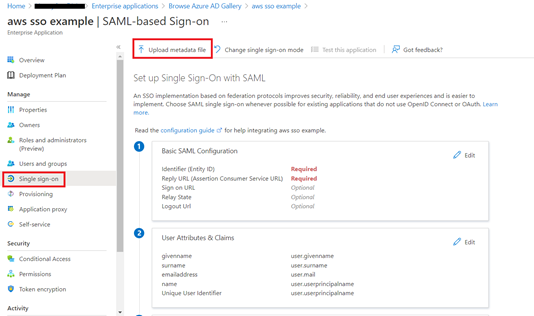
  • In our Azure AD application, we need to select “Single sign-on” and set up Single Sign-on with SAML. We should upload the metadata files that we download before from the AWS SSO side.
  • After uploading SAML file, identifier and reply URL should be set from the SAML file. If the reply URL is not set, you cannot continue because it is a required field. You can get it from AWS SSO → Settings →Authentication →View details. AWS SSO ACS URL is your reply URL. Save all details here.
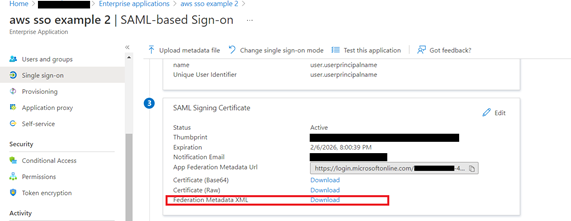
  • We need to download SAML SSO XML metadata from the Azure side to upload AWS SSO.
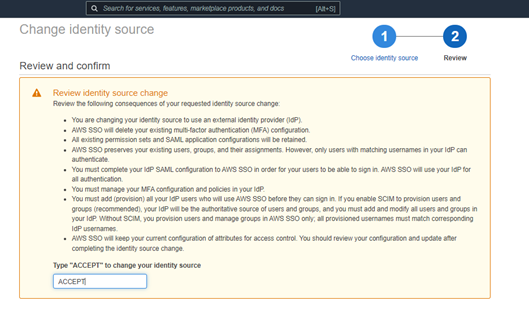
  • Accept your changes.
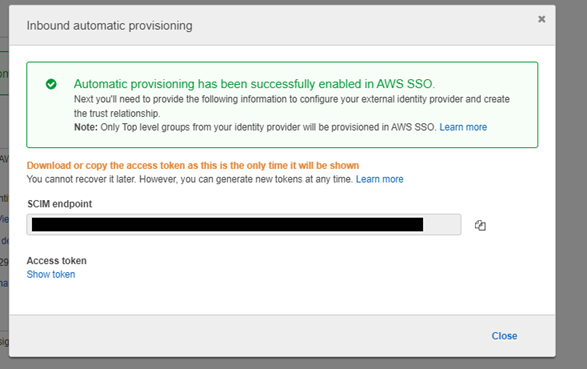
  • After all these steps, we need to enable automatic provisioning. AWS SSO supports automatic provisioning (synchronization) of user and group information from your identity provider (IdP) into AWS SSO using the System for Cross-domain Identity Management (SCIM) v2.0 protocol. To enable it, we need to select the settings → provisioning part. Copy the SCIM endpoint and access token.
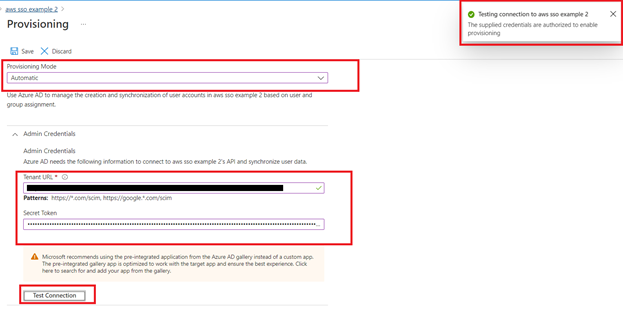
  • Paste these credentials to Azure AD and test your connection.
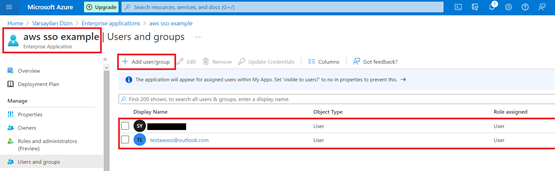
  • Now create Group and Add your users to the Group that we have created.
  • Start provisioning. You can see the current cycle status. Your Azure AD users should be seen on the AWS SSO side.
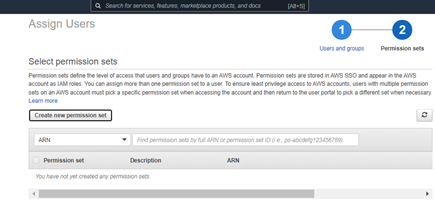
  • We need to set our access control mechanism for AWS Management Console and AWS CLI side. To do this, we need to assign users to AWS accounts.
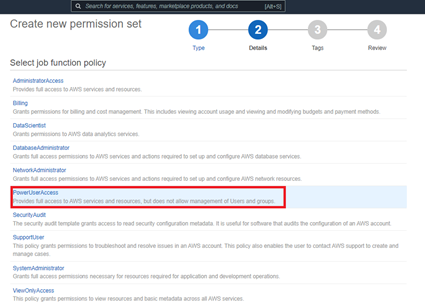
  • Create a new permission set. We’re using an existing job function policy.
  • For example, let’s assume our test user is a developer for AWS. We need to Power User Access.
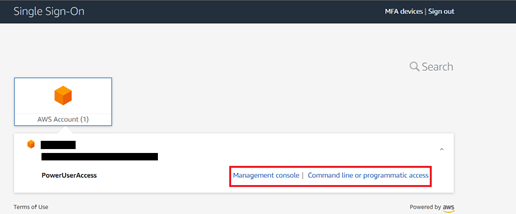
  • After all these, we can use the user portal URL and SSO with your Azure AD credentials (e-mail and password).
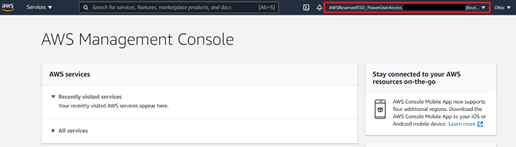
  • After successful login, we can see AWS console successfully!